Medicare provider enrollment in 2026 is the CMS process healthcare providers and suppliers use to obtain and maintain Medicare billing privileges. The process typically involves confirming an NPI, choosing the correct enrollment transaction, submitting information through PECOS, providing supporting documents, responding to Medicare contractors, and keeping enrollment records current after approval.
For practice managers and healthcare organizations, Medicare enrollment is much more than paperwork. It can affect provider onboarding, claims submission, reimbursement, new practice locations, ownership changes, and ongoing regulatory compliance.
A provider can hold an active professional license, have an NPI, and already be treating patients but still not be properly enrolled to bill Medicare.
That is why Medicare enrollment should be managed as part of the practice’s revenue cycle and compliance workflow rather than treated as a one-time credentialing task.
Key Takeaways
- An NPI does not automatically provide Medicare billing privileges.
- PECOS is CMS’s online Medicare enrollment management system.
- Enrollment requirements vary by provider and supplier type.
- The 2026 Medicare enrollment application fee is $750 for applicants subject to the fee.
- Many physicians, non-physician practitioners, and their organizations are exempt from the application fee.
- Most providers and suppliers generally revalidate every five years.
- DMEPOS suppliers generally revalidate every three years.
- Enrollment changes may have different reporting deadlines depending on provider type.
- Practices should verify current CMS enrollment moratoria before starting certain enrollments.
What Is Medicare Provider Enrollment?
Medicare provider enrollment is the process CMS uses to determine whether a healthcare professional, practice, facility, or supplier meets Medicare enrollment requirements and can receive payment for covered Medicare services.
Enrollment can apply to individual clinicians, group practices, clinics, hospitals, laboratories, institutional providers, DMEPOS suppliers, and other eligible healthcare organizations.
The exact process depends on who is enrolling and what the provider or organization intends to do.
For example, a physician joining an existing medical group may need a different Medicare transaction than a physician opening a new practice.
Before starting an application, practice managers should be able to answer several questions:
- Is the provider currently enrolled in Medicare?
- Is the correct practice location listed?
- Is the provider properly associated with the billing organization?
- Are ownership and tax records accurate?
- Does the provider need to reassign Medicare benefits?
- Is the Medicare enrollment record active and current?
These details determine whether a provider is actually ready for Medicare billing.
Is an NPI the Same as Medicare Enrollment?
No.
A National Provider Identifier, or NPI, is a unique healthcare identifier issued through the National Plan and Provider Enumeration System.
An active NPI is generally required for Medicare enrollment, but receiving an NPI does not automatically give a provider Medicare billing privileges.
A useful way to think about the difference is:
NPI = identification
Medicare enrollment = authorization to participate in Medicare billing
This distinction becomes particularly important when onboarding providers.
A physician, nurse practitioner, therapist, or other eligible professional may already have an NPI from previous employment. However, that provider may still need a Medicare enrollment action, reassignment, practice-location update, or another change before the new organization can properly bill for Medicare services.
Who Needs Medicare Provider Enrollment?
Healthcare professionals and organizations that intend to bill Medicare for covered services generally need the appropriate Medicare enrollment.
Depending on the situation, this may include:
- Physicians
- Nurse practitioners
- Other eligible non-physician practitioners
- Medical groups
- Clinics
- Hospitals
- Laboratories
- Institutional providers
- DMEPOS suppliers
- Certain professionals who enroll only to order or certify Medicare-covered services
The enrollment pathway varies by provider type.
An individual clinician joining an established group does not necessarily follow the same process as a new clinic, hospital, home health agency, laboratory, or DMEPOS supplier.
Before beginning Medicare provider enrollment in 2026, determine exactly who is enrolling, which organization will bill Medicare, where services will be delivered, and whether Medicare benefits need to be reassigned.
Which Medicare Enrollment Application Applies?
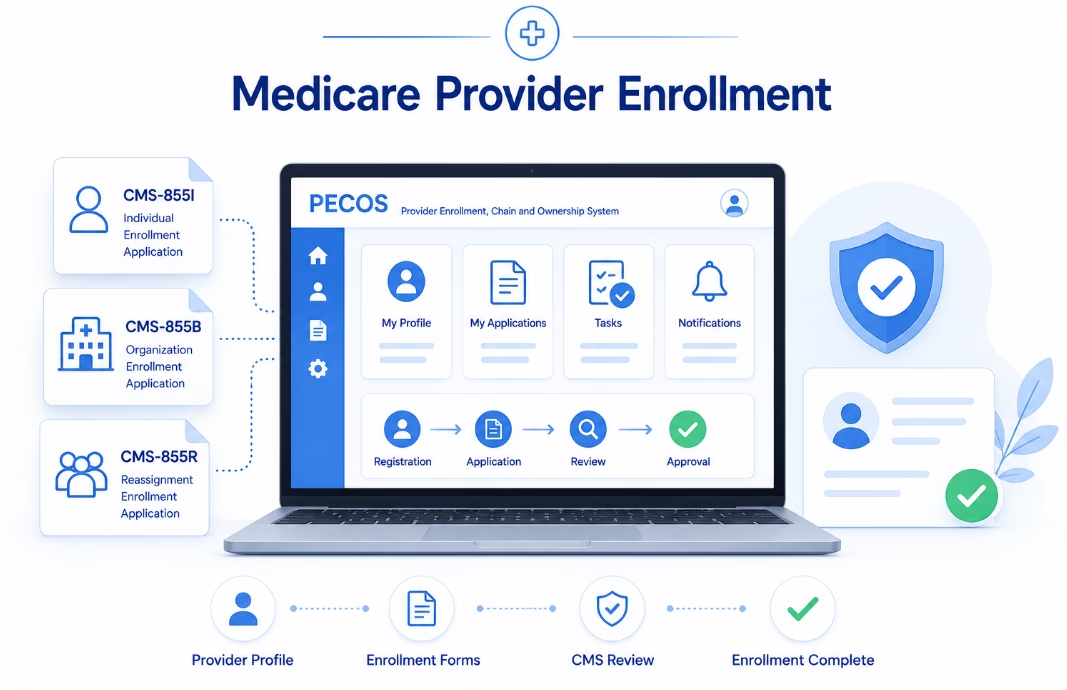
PECOS uses a scenario-driven online enrollment process, but understanding the main CMS enrollment applications helps practice managers prepare the correct information.
Common applications include:
CMS-855A: Primarily used for institutional providers.
CMS-855B: Used by clinics, group practices, and certain organizational suppliers.
CMS-855I: Used by individual physicians and eligible non-physician practitioners.
CMS-855O: Used by eligible professionals enrolling only to order or certify certain Medicare services.
CMS-855S: Used by DMEPOS suppliers.
CMS-20134: Used for Medicare Diabetes Prevention Program suppliers.
Reassignment-related transactions for physicians and non-physician practitioners are handled through the applicable CMS-855I enrollment framework.
Choosing the correct transaction matters. Submitting the wrong enrollment scenario can create unnecessary delays and additional administrative work.
How Does Medicare Provider Enrollment Work in 2026?
A structured process can make enrollment easier to manage and reduce avoidable errors.
Step 1: Verify the NPI and CMS Access
Start by confirming that the provider or organization has the appropriate active NPI.
The practice should also verify access to CMS’s Identity & Access Management system because those credentials are used to access Medicare enrollment systems such as PECOS.
Organizations should make sure the appropriate Authorized Official and staff members have the necessary system access before beginning the application.
An otherwise accurate enrollment can still be delayed when the correct individuals cannot access or certify the application.
Step 2: Define the Correct Enrollment Scenario
Determine exactly what type of transaction is required.
Common scenarios include:
- Initial enrollment
- Change to an existing enrollment
- Reassignment
- Revalidation
- Adding or changing a practice location
- Updating organizational information
Do not assume that every newly hired provider follows the same process.
For example, a physician who is already enrolled in Medicare and joining a new medical group may need a different transaction than a physician enrolling in Medicare for the first time.
Step 3: Gather Documents Before Starting
One of the easiest ways to create enrollment delays is to begin the application before collecting the required information.
Depending on the provider type, practices may need:
- Legal-name information
- Social Security or tax identification information
- Practice addresses
- Professional licenses
- Ownership information
- Managing-control information
- Organizational documents
- Banking information
- Supporting certifications or records
Review information across systems before submission.
Legal names, addresses, tax information, ownership details, banking documents, and practice records should be consistent.
Small discrepancies can result in clarification requests and additional processing time.
Step 4: Submit Through PECOS
PECOS allows providers and suppliers to manage many Medicare enrollment activities online.
Through PECOS, organizations can submit enrollment information, update existing records, upload supporting documentation, electronically sign applications, complete revalidation, and review information already on file.
For most practices, PECOS is the practical starting point for managing Medicare enrollment electronically.
Step 5: Complete EFT and Supporting Documentation
Certain Medicare enrollment transactions require electronic funds transfer information.
Depending on the transaction, providers may need to submit banking documentation such as a voided check or bank letter showing the appropriate legal name and account information.
Make sure the banking documentation matches the enrollment information.
An inconsistent business or legal name can lead to follow-up requests.
Step 6: Determine Whether an Application Fee Applies
The Medicare enrollment application fee for 2026 is $750 for applicants subject to the fee.
However, not every provider or organization is required to pay it.
Physicians, non-physician practitioners, physician organizations, non-physician organizations, and Medicare Diabetes Prevention Program suppliers generally do not pay the Medicare enrollment application fee.
Certain institutional providers and suppliers may be subject to the fee for applicable transactions.
Do not automatically assume a fee is required. Confirm the applicant category and enrollment transaction before payment.
Step 7: Monitor the Medicare Contractor Review
Submitting the application is not the final step.
A Medicare contractor may request clarification, corrections, or additional documents during the review process.
Practices should assign responsibility for monitoring PECOS, email, and contractor communications after submission.
CMS currently instructs applicants to respond to requests for additional information within the applicable timeframe. Failing to respond can result in the application being rejected.
Successful enrollment management therefore requires active follow-up after submission.
How Long Does Medicare Enrollment Take?
There is no single processing period that applies to every Medicare enrollment.
Processing time can vary based on:
- Provider or supplier type
- Enrollment transaction
- Application completeness
- Supporting documentation
- Contractor workload and review
- Screening requirements
- Site visits when applicable
- Certification requirements
- Requests for additional information
PECOS can improve administrative efficiency, but it does not eliminate Medicare’s review requirements.
Practices should therefore start enrollment early in the provider-onboarding process.
Waiting until a clinician’s first scheduled day to address Medicare enrollment can create unnecessary billing and revenue problems.
How Medicare Enrollment Problems Affect a Practice
Consider a medical group hiring a physician and a nurse practitioner.
Both clinicians already have NPIs, so the practice initially assumes they are ready to treat Medicare patients.
During onboarding, the practice manager discovers that the physician’s existing Medicare record is connected to a previous organization, while the nurse practitioner has an NPI but has never completed the required Medicare enrollment.
The clinic itself is already enrolled.
These providers do not need identical enrollment workflows.
The practice may need to identify separate transactions, confirm CMS access, verify addresses and licenses, complete the appropriate PECOS activity, handle reassignment where necessary, and organize supporting records for each provider.
The lesson is important:
Provider onboarding is not complete simply because an NPI exists.
Enrollment status, locations, organizational relationships, reassignment, documentation, and billing arrangements need to align with how the practice intends to operate.
What Is Medicare Revalidation?
Medicare enrollment requires ongoing maintenance after approval.
Most providers and suppliers generally need to revalidate their enrollment every five years.
DMEPOS suppliers generally revalidate every three years.
CMS may also require an off-cycle revalidation.
Revalidation should be treated as a complete review of the Medicare enrollment record rather than simply an administrative renewal.
Practices should verify that information such as practice locations, organizational relationships, ownership, licenses, and other enrollment details remain accurate.
Revalidation deadlines should be added to the same compliance calendar used for license renewals, payer credentialing, insurance renewals, CAQH maintenance, and other provider requirements.
When Must Medicare Enrollment Changes Be Reported?
One common mistake is assuming that every Medicare enrollment change follows a universal 30-day reporting rule.
It does not.
Reporting deadlines depend on the provider or supplier category and the type of change.
For certain physicians, non-physician practitioners, and related organizations, changes involving ownership or control, practice locations, and final adverse legal actions may have shorter reporting requirements, while other updates may follow different timelines.
DMEPOS suppliers and other Medicare provider categories can also have category-specific reporting obligations.
The operational rule is simple:
Do not apply one reporting deadline to every Medicare enrollment.
Whenever there is a significant ownership, address, management, organizational, or operational change, identify the Medicare provider category and verify the current CMS reporting requirement.
What Medicare Enrollment Moratoria Matter in 2026?
Practices planning certain enrollments should also review current CMS moratoria before beginning an application or business transaction.
In 2026, CMS implemented temporary nationwide Medicare enrollment restrictions affecting certain DMEPOS medical supply companies.
CMS also implemented temporary nationwide enrollment moratoria affecting new Home Health Agencies and hospices.
These restrictions can affect certain initial enrollment and ownership-change transactions.
Existing enrolled organizations generally remain subject to their normal compliance and revalidation responsibilities.
Moratoria can be extended, modified, or lifted. Practices considering a new enrollment, acquisition, expansion, or ownership change in an affected provider category should therefore verify the latest CMS status before taking action.
Common Medicare Provider Enrollment Mistakes
Several problems repeatedly create avoidable administrative delays.
Treating an NPI as Proof of Medicare Enrollment
An NPI identifies a provider. It does not automatically establish Medicare billing privileges.
Choosing the Wrong Enrollment Transaction
Initial enrollment, revalidation, reassignment, organizational enrollment, location changes, and other updates are separate enrollment scenarios.
Using Inconsistent Information
Legal names, addresses, tax records, ownership details, licenses, and banking information should be reviewed before submission.
Submitting the Application and Forgetting About It
Contractors may request additional information. Practices need a defined process for monitoring and responding.
Missing Revalidation Deadlines
Revalidation should be tracked proactively instead of relying entirely on reminder notices.
Failing to Report Organizational Changes
Ownership changes, relocations, new practice locations, management changes, and similar events may create Medicare reporting obligations.
Assuming Every Provider Type Follows the Same Rules
Documentation, fees, reporting requirements, screening, certification, and revalidation can vary substantially by provider category.
Medicare Provider Enrollment Checklist for Practice Managers
Before considering an enrollment complete, confirm that the practice has reviewed:
- Active individual or organizational NPI
- Appropriate I&A and PECOS access
- Correct enrollment transaction
- Correct provider or supplier category
- Accurate legal name and tax information
- Current licenses and certifications
- Correct practice locations
- Ownership and managing-control information
- Appropriate reassignment or group relationship
- EFT and banking documentation when required
- Supporting documentation
- Current application-fee requirements
- Relevant CMS moratorium status
- Appropriate electronic signatures
- Saved submission records
- PECOS and contractor communications
- Revalidation deadlines
- Responsibility for future enrollment updates
A structured checklist helps make Medicare enrollment repeatable instead of dependent on individual staff members remembering every requirement.
Frequently Asked Questions About Medicare Provider Enrollment
Can a provider bill Medicare as soon as they receive an NPI?
Not necessarily. NPI enumeration and Medicare enrollment are separate processes. An NPI may be required for Medicare enrollment, but it does not by itself establish Medicare billing privileges.
Is PECOS required for Medicare enrollment?
PECOS is CMS’s online Medicare enrollment system and is widely used to submit and manage enrollment transactions. Paper enrollment applications may remain available for applicable transactions, but online enrollment can simplify submission and document management.
What is the Medicare enrollment fee in 2026?
The Medicare enrollment application fee is $750 in 2026 for provider and supplier categories subject to the fee. Many physicians, non-physician practitioners, and their organizations are exempt.
How often must Medicare providers revalidate?
Most Medicare providers and suppliers generally revalidate every five years. DMEPOS suppliers generally revalidate every three years. CMS can also request off-cycle revalidation.
What happens if a Medicare contractor asks for more information?
Respond as quickly as possible and within the required timeframe. Failure to provide requested information can delay processing or result in rejection of the application.
Does every Medicare enrollment change have a 30-day reporting deadline?
No. Reporting requirements depend on the provider or supplier category and the type of information being changed.
Turn Medicare Enrollment Into a Managed Workflow
Medicare provider enrollment 2026 is easier to manage when practices treat it as an ongoing operational process rather than an isolated application.
Start with the correct NPI and enrollment scenario. Make sure PECOS, licensing, ownership, tax, banking, and practice information are consistent. Monitor contractor communications after submission, and continue tracking revalidation and enrollment changes after approval.
For organizations managing multiple providers, payer applications, locations, renewals, and compliance deadlines, maintaining these workflows manually can quickly become difficult.
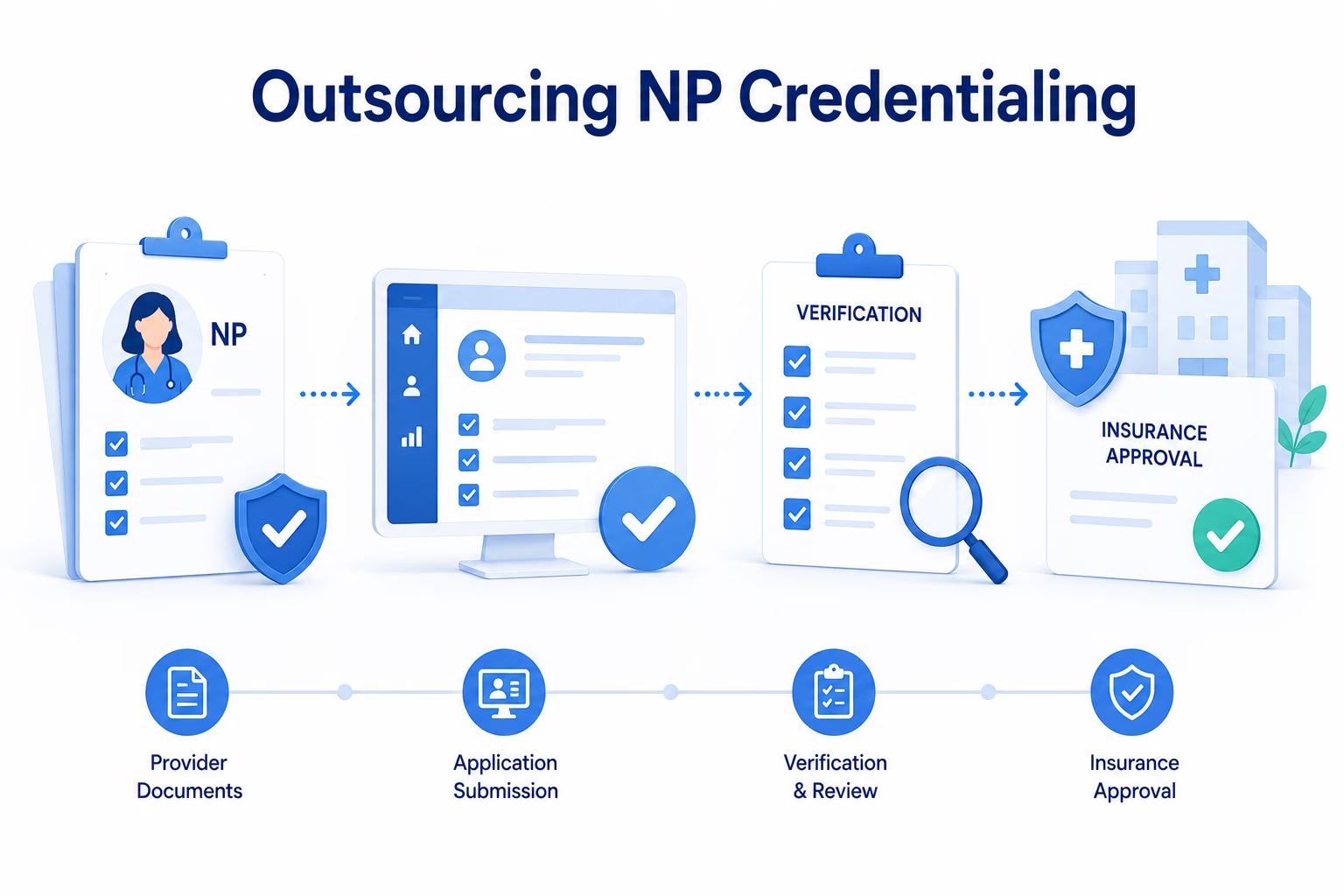
eClinicAssist helps healthcare practices manage provider credentialing, payer enrollment, recredentialing, credentials management, and compliance workflows.
Need help keeping Medicare enrollment and provider credentialing organized? Contact eClinicAssist today.
Disclaimer: This article is provided for general educational purposes only and is not legal, regulatory, billing, or reimbursement advice. Medicare enrollment requirements vary by provider and supplier type and may change. Always verify current requirements with CMS and the applicable Medicare enrollment contractor before submitting or modifying an enrollment.