
Medicare compliance in 2026 requires healthcare practices to maintain accurate enrollment information, report applicable changes within required deadlines, and monitor their Medicare billing privileges. For practice managers and healthcare administrators, these responsibilities are closely connected to provider onboarding, reimbursement, and revenue cycle management.
Medicare compliance in 2026 includes reporting specified enrollment changes within 30 days, reporting other changes within applicable deadlines, completing required revalidations, and maintaining accurate provider records. CMS may deactivate billing privileges for certain enrollment failures, including six consecutive calendar months without Medicare claims.
This guide explains the most important Medicare provider enrollment compliance requirements, the consequences of missing deadlines, and a practical workflow for maintaining accurate records throughout the year.
Why Medicare Compliance Matters for Healthcare Practices in 2026
Medicare enrollment is not a one-time administrative process. After initial approval, providers and suppliers must continue meeting applicable enrollment and reporting requirements.
These responsibilities include maintaining accurate information in the Provider Enrollment, Chain, and Ownership System (PECOS), responding to Medicare Administrative Contractor (MAC) requests, and completing periodic enrollment revalidation.
Depending on the circumstances, failure to meet these requirements may lead to:
- Requests for additional enrollment documentation.
- Administrative delays in processing enrollment changes.
- Medicare payment holds.
- Deactivation of Medicare billing privileges.
- Revocation when applicable regulatory grounds are established.
- Additional claims or reimbursement complications.
Not every enrollment error results in enforcement action, and the consequences depend on the specific circumstances and applicable regulations.
Maintaining organized provider records and responding promptly to enrollment requirements can help reduce avoidable administrative problems.
Understanding the Medicare 30-Day and 90-Day Reporting Rules
Medicare providers and suppliers must report changes to their enrollment information within the deadlines applicable to their provider or supplier category.
Under 42 CFR § 424.516, physicians, nonphysician practitioners, and their organizations generally must report specified changes within 30 days and other enrollment changes within 90 days.
Changes Generally Requiring Reporting Within 30 Days
For many healthcare providers and group practices, examples include:
- Ownership or control changes: Changes involving ownership, control, or certain authorized and delegated officials, as applicable.
- Practice location changes: Additions, closures, relocations, or other reportable changes involving Medicare practice locations.
- Adverse legal actions: Reportable final adverse legal actions, including certain license suspensions, revocations, or other specified actions.
- Other category-specific changes: Additional changes specifically identified in the regulations for the relevant provider or supplier type.
For example, if a physician group relocates to a different suite or opens another practice location, the organization should determine whether the change requires an updated Medicare enrollment submission within the applicable reporting period.
Practices should not assume that a change is exempt simply because it appears administratively minor.
Changes Generally Requiring Reporting Within 90 Days
Other changes to Medicare enrollment information generally must be reported within 90 days for many provider and supplier categories.
Examples may include certain administrative, contact, or organizational information changes that do not fall under a shorter reporting requirement.
Important: Different provider categories have different rules. For example, DMEPOS suppliers have additional 30-day reporting requirements, and independent diagnostic testing facilities are subject to specific enrollment obligations.
Always verify the applicable reporting deadline before deciding when to submit an update.
CMS provides additional guidance through its Medicare Provider and Supplier Enrollment resources.
How to Submit Medicare Enrollment Changes Through PECOS
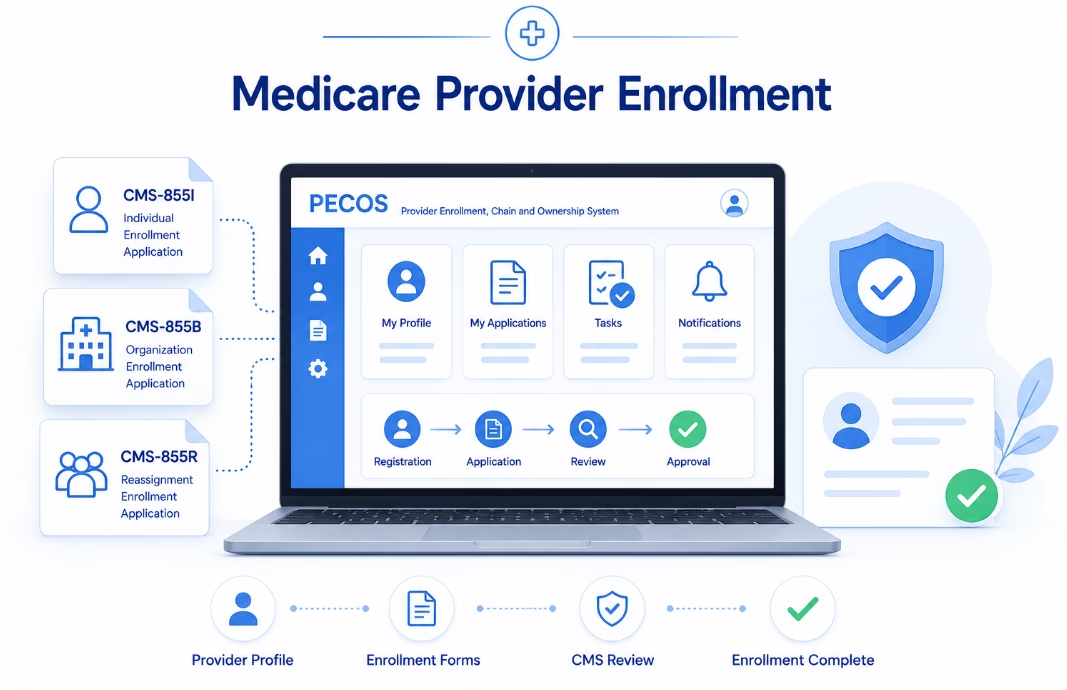
PECOS is CMS’s electronic Medicare provider enrollment system. Eligible providers and suppliers can use it to submit initial enrollment applications, changes of information, and revalidation applications.
Step 1: Identify the Reportable Change
Determine what information has changed and which Medicare enrollment record is affected.
Examples include:
- Individual provider information.
- Group practice enrollment information.
- Ownership and management disclosures.
- Practice location details.
- Reassignment relationships.
- Other applicable organizational information.
Step 2: Review the Existing Enrollment Record
Access the relevant Medicare enrollment record through the authorized PECOS account.
Compare the information currently on file with the provider’s or organization’s supporting records.
Identify additional information that may require correction before submission.
Step 3: Prepare Supporting Documentation
Depending on the change, supporting documents may include:
- Legal business documentation.
- Tax identification records.
- Ownership and management information.
- Practice location documentation.
- Professional license information.
- Applicable authorization or reassignment documents.
- Other records requested by CMS or the MAC.
Step 4: Submit the Change of Information
Complete the appropriate enrollment update in PECOS and provide the required certifications, signatures, and supporting documentation.
When electronic submission is unavailable or inappropriate for the particular circumstances, CMS may permit the applicable paper enrollment process.
Step 5: Track the Application
Retain the submission confirmation and monitor the application’s status.
Respond promptly to requests for clarification or additional documentation.
Practices should not assume that submitting an update automatically means the MAC has completed its review.
Access the official system through the Medicare PECOS portal.
Medicare Deactivation vs. Revocation: What’s the Difference?
Medicare deactivation and revocation are separate administrative actions.
Understanding the difference is important because their consequences and corrective procedures are not identical.
| Deactivation | Revocation |
|---|---|
| Stops Medicare billing privileges under an applicable deactivation basis. | Terminates enrollment and billing privileges under an applicable revocation basis. |
| May result from inactivity, missed revalidation, or certain enrollment failures. | May result from regulatory violations or other grounds specified in Medicare enrollment rules. |
| Requires the provider or supplier to satisfy applicable reactivation procedures. | May involve additional consequences, including reenrollment restrictions when applicable. |
| Medicare generally does not reimburse services furnished during the deactivated period. | Consequences depend on the applicable revocation authority, effective date, and circumstances. |
Not every late enrollment update automatically results in deactivation or revocation.
Providers receiving a CMS or MAC notice should review the specific action, effective date, applicable deadlines, and available response procedures.
The Medicare Six-Month Claims Inactivity Rule
One important Medicare enrollment risk involves prolonged periods without submitting Medicare claims.
Under 42 CFR § 424.540, CMS may deactivate Medicare billing privileges when a provider or supplier does not submit any Medicare claims for six consecutive calendar months.
This is a potential basis for deactivation, not an automatic requirement that every provider be deactivated exactly six months after the last claim.
Why Practices Should Monitor Medicare Billing Activity
Some healthcare organizations may have providers who rarely treat Medicare beneficiaries or whose Medicare billing activity changes over time.
Without monitoring, a practice may not recognize an inactive enrollment record until a billing or enrollment issue occurs.
Recommended safeguards include:
- Review Medicare claims activity periodically.
- Investigate prolonged periods without submitted claims.
- Maintain current correspondence information.
- Monitor enrollment notices from CMS and the MAC.
- Check provider and group enrollment status when necessary.
- Follow applicable reactivation procedures if billing privileges are deactivated.
Important: Medicare claims inactivity is only one possible basis for deactivation. Other enrollment issues may also affect billing privileges.
Medicare Revalidation Requirements in 2026
Medicare revalidation requires enrolled providers and suppliers to periodically confirm and update their enrollment information.
CMS generally requires:
- Most Medicare providers and suppliers: Revalidation every five years.
- DMEPOS suppliers: Revalidation every three years.
- Off-cycle revalidation: CMS may request revalidation outside the ordinary cycle when appropriate.
Providers should monitor their revalidation due dates rather than relying only on mailed or emailed notices.
CMS publishes revalidation information through its official enrollment resources.
What Happens if a Medicare Revalidation Deadline Is Missed?
Failing to revalidate on time may result in a Medicare payment hold or deactivation of billing privileges.
If billing privileges are deactivated, the provider or supplier generally must submit the required enrollment information to reactivate them.
CMS explains that Medicare does not reimburse services furnished during the period of deactivation.
For current instructions and due-date information, review the CMS Medicare Revalidation guidance.
How Medicare Enrollment Problems Can Affect Revenue Cycle Management
Medicare enrollment information influences whether a provider or organization has the appropriate billing privileges for its services.
When enrollment problems remain unresolved, practices may experience payment delays, additional billing work, or interruptions in Medicare reimbursement.
Examples of Enrollment-Related Billing Problems
- Claims submitted under an inactive Medicare enrollment record.
- Incorrect provider or organizational enrollment information.
- Missing or incomplete reassignment arrangements.
- Unresolved practice location changes.
- Billing activity during an applicable period of deactivation.
- Missed revalidation requirements.
However, not every Medicare claim rejection or denial is related to enrollment.
Coverage, medical necessity, coding, authorization, eligibility, and other claim requirements can also affect reimbursement.
A well-organized revenue cycle workflow should coordinate credentialing, enrollment, and billing teams without assuming that every claim problem has the same cause.
For additional guidance, read our article on reducing payer enrollment delays.
A Practical Monthly Medicare Compliance Workflow
Healthcare practices can use a monthly administrative review to identify enrollment changes and monitor important deadlines.
This is a recommended internal workflow, not a replacement for the actual 30-day, 90-day, or other applicable reporting requirements.
1. Review Provider and Organization Information
Compare current practice records with applicable Medicare enrollment information.
Review provider names, NPIs, practice locations, ownership information, and organizational relationships.
2. Check for Recently Reportable Changes
Ask whether any providers have relocated, joined or left the organization, changed relevant ownership or management information, or experienced another reportable event.
Do not wait for the next monthly review when a change must be reported sooner.
3. Review Supporting Documents
Maintain current records for applicable enrollment activities, including legal business information, tax documents, professional credentials, and practice location details.
4. Track PECOS Applications
Review outstanding enrollment applications, changes of information, and revalidation submissions.
Monitor requests for additional information and confirm who is responsible for responding.
5. Monitor Medicare Claims Activity
Review unusual periods of Medicare billing inactivity and investigate any indications of enrollment-related claim problems.
6. Check Revalidation Deadlines
Review the CMS revalidation information for relevant individual and organizational enrollments.
Assign responsibility for preparing required documentation before applicable deadlines.
7. Document and Escalate Findings
Maintain a tracking record showing identified problems, assigned staff, applicable deadlines, corrective actions, and final resolution status.
Escalate urgent concerns, including possible billing privilege deactivation or missed mandatory deadlines, to the appropriate practice leadership or compliance personnel.
Example: A Practice Location Change That Was Not Reported
Consider a medical practice that relocates one of its offices to a different suite.
The practice updates its website, patient forms, and internal billing system but does not review whether the change must also be reported through Medicare enrollment.
During a later administrative review, the team discovers that the relevant PECOS information still reflects the prior location.
The practice now must determine the applicable reporting obligations, submit any required corrections, and address questions raised by its Medicare Administrative Contractor.
Depending on the facts, an unreported practice location change may create administrative or enrollment compliance concerns.
However, the situation does not automatically result in an immediate suspension of all Medicare payments or a fixed number of days without reimbursement.
The lesson: Changes to practice locations should trigger a review of all relevant enrollment records, not just internal systems and patient-facing information.
Best Practices for Medicare Enrollment Compliance
A practical compliance program should connect provider enrollment requirements with ongoing administrative responsibilities.
Maintain Accurate Information Across Systems
Review PECOS, NPPES, payer enrollment records, and internal practice systems when relevant information changes.
Remember that updating one system does not necessarily update the others.
For a useful explanation of these differences, see our PECOS vs. CAQH vs. NPPES comparison.
Assign Clear Responsibility
Identify who monitors Medicare enrollment records, prepares applications, responds to contractor requests, and tracks revalidation deadlines.
Use Centralized Tracking
Maintain an administrative system for important dates, open applications, required documents, and outstanding follow-up activities.
Coordinate Credentialing and Billing Teams
Ensure that provider onboarding, Medicare enrollment status, reassignment information, and billing workflows are reviewed together when necessary.
Review Recurring Administrative Errors
Identify why problems occurred and implement controls to reduce repeated mistakes.
Our guide to credentialing errors and their hidden costs discusses other common administrative issues.
Medicare Compliance Checklist for 2026
Use this checklist when reviewing Medicare enrollment records and administrative procedures:
- Confirm active Medicare enrollment and billing privileges.
- Review current individual and organizational NPI information.
- Verify legal business name and applicable tax information.
- Review ownership and managing-control records.
- Confirm active practice locations.
- Identify changes requiring reporting within 30 days.
- Identify changes subject to 90-day or other applicable deadlines.
- Review open PECOS applications.
- Monitor Medicare Administrative Contractor correspondence.
- Check revalidation due dates.
- Review prolonged periods without Medicare claim submissions.
- Confirm applicable provider reassignment information.
- Maintain submission confirmations and supporting documentation.
- Document unresolved issues and corrective actions.
The checklist should be adapted to the organization’s provider types, Medicare participation arrangements, and other applicable regulatory requirements.
How eClinicAssist Supports Medicare Enrollment Administration
Maintaining Medicare enrollment records and tracking reporting deadlines can require ongoing coordination between providers, practice administrators, and billing teams.
eClinicAssist helps healthcare organizations with administrative credentialing and enrollment activities, including:
- Provider information and documentation management.
- Medicare enrollment application preparation.
- PECOS enrollment changes and updates.
- Provider reassignment coordination.
- Revalidation and renewal tracking.
- Application status monitoring and follow-up.
- Coordination of provider enrollment records with billing operations.
Our goal is to help healthcare practices maintain organized records, identify outstanding requirements, and reduce avoidable administrative delays.
Final enrollment decisions, billing privileges, processing times, and regulatory actions remain subject to CMS and applicable Medicare Administrative Contractors.
Need help managing Medicare enrollment, PECOS updates, or revalidation requirements?
Contact eClinicAssist to discuss your Medicare enrollment needs.
Frequently Asked Questions About Medicare Compliance in 2026
What are the main Medicare enrollment compliance requirements in 2026?
Important requirements include maintaining accurate Medicare enrollment information, reporting applicable changes within required deadlines, responding to CMS and MAC requests, and completing required enrollment revalidations.
Which Medicare enrollment changes must be reported within 30 days?
For many providers and group practices, specified ownership or control changes, practice location changes, and final adverse legal actions generally require reporting within 30 days. Requirements vary by provider or supplier category.
Does Medicare allow 90 days for some enrollment changes?
Yes. For many provider categories, enrollment changes not subject to a shorter reporting requirement generally must be reported within 90 days.
Can Medicare deactivate a provider after six months without claims?
Yes. CMS may deactivate billing privileges when a provider or supplier does not submit Medicare claims for six consecutive calendar months, subject to the applicable regulations and circumstances.
How often must Medicare providers revalidate enrollment?
Most providers and suppliers generally revalidate every five years, while DMEPOS suppliers generally revalidate every three years. CMS may also request off-cycle revalidation.
Does missing a Medicare revalidation deadline stop payments?
Missing a required revalidation deadline may lead to a Medicare payment hold or deactivation of billing privileges. Providers should follow CMS and MAC instructions promptly when a deadline or notice is received.
Is Medicare deactivation the same as revocation?
No. Deactivation stops billing privileges under an applicable deactivation basis, while revocation is a separate administrative action with potentially more serious consequences.
Does updating NPPES automatically update Medicare PECOS?
No. NPPES and PECOS serve different functions. Providers generally must maintain and update the applicable records separately.
Disclaimer: This article provides general educational and administrative information about Medicare provider enrollment, reporting requirements, and compliance management. It does not constitute legal, regulatory, credentialing, or billing advice. Medicare requirements vary by provider or supplier category and individual circumstances. Confirm current obligations with CMS, the appropriate Medicare Administrative Contractor, or qualified professional advisers. eClinicAssist does not guarantee Medicare enrollment approval, uninterrupted billing privileges, processing times, or reimbursement outcomes.