
Maintaining accurate Medicare provider enrollment records is an ongoing responsibility for healthcare practices. Changes involving practice locations, ownership information, provider affiliations, and Medicare billing activity may affect enrollment status and reimbursement when they are not properly managed.
A PECOS enrollment audit is a structured review of Medicare provider and organization records, reporting deadlines, reassignment relationships, revalidation requirements, and unresolved enrollment issues. Regular audits help practices identify inaccurate information and address administrative risks before they interfere with billing operations. For a closer look at common issues, read our guide to Medicare enrollment errors, EFT, and revalidation.
This guide provides a practical 2026 PECOS enrollment audit checklist for practice managers, credentialing professionals, healthcare administrators, and revenue cycle teams.
Why Should Healthcare Practices Audit PECOS Enrollment Records?
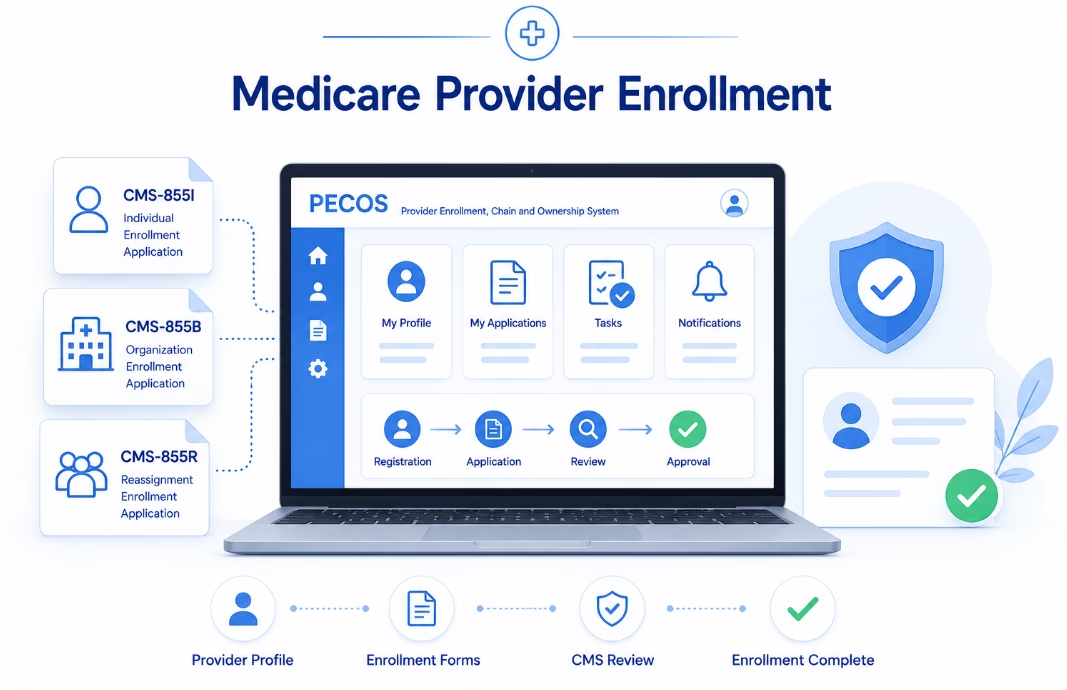
The Provider Enrollment, Chain, and Ownership System (PECOS) is CMS’s electronic Medicare enrollment system.
Healthcare providers and suppliers use PECOS to manage applicable Medicare enrollment activities, including initial enrollment, changes of information, reassignments, and revalidation.
Enrollment records must remain accurate as a practice hires providers, relocates offices, changes its organizational structure, or modifies other reportable information.
Common Problems a PECOS Audit Can Identify
- Outdated practice locations.
- Incorrect ownership or organizational information.
- Missing provider reassignment relationships.
- Incomplete Medicare enrollment applications.
- Unresolved Medicare Administrative Contractor requests.
- Upcoming revalidation deadlines.
- Potential billing privilege deactivation.
- Inaccurate contact or correspondence information.
Not every data discrepancy results in a Medicare enforcement action. However, practices should identify and correct information that is inaccurate or no longer satisfies applicable enrollment requirements.
For a broader explanation of enrollment obligations, read our 2026 Medicare enrollment compliance and revocation prevention guide.
What Should a PECOS Enrollment Audit Include?
A practical audit should examine individual provider records, organizational enrollment, applicable Medicare billing relationships, outstanding applications, and ongoing compliance responsibilities.
1. Individual Provider Information
Review each Medicare-enrolled healthcare professional’s identifying information and enrollment status.
Important information may include:
- Legal provider name.
- Individual National Provider Identifier (NPI).
- Professional specialty and taxonomy information.
- Professional license details, where applicable.
- Current Medicare enrollment status.
- Correspondence information.
- Relevant practice locations.
- Applicable reassignment relationships.
Confirm that the record accurately describes the provider and the Medicare enrollment arrangement.
2. Organizational Enrollment Information
Group practices and other healthcare organizations should review their Medicare enrollment records separately from individual provider records.
Items to verify include:
- Legal business name.
- Organizational NPI, where applicable.
- Taxpayer Identification Number (TIN).
- Ownership and control information.
- Managing employees and other reportable officials.
- Practice and service locations.
- Correspondence addresses.
- Electronic funds transfer information.
- Applicable provider and supplier enrollment categories.
The information should accurately reflect the organization’s legal and operational structure.
3. Provider Reassignment Relationships
When eligible individual practitioners reassign Medicare benefits to a group practice or other eligible organization, the applicable reassignment information must be maintained.
An audit should verify whether:
- The individual practitioner has the required Medicare enrollment.
- The receiving organization has the applicable enrollment.
- The appropriate reassignment relationship is established.
- Former affiliations requiring termination have been addressed.
- Relevant effective dates and billing arrangements are correct.
An active NPI alone does not establish that a group practice can bill Medicare for every service furnished by an individual practitioner.
Medicare Enrollment Reporting Deadlines: 30 Days vs. 90 Days
Medicare providers and suppliers must report changes to their enrollment information within deadlines established by the applicable regulations.
Under 42 CFR § 424.516, physicians, nonphysician practitioners, and their organizations generally must report specified changes within 30 days and other changes within 90 days.
Changes Generally Subject to 30-Day Reporting
For many medical practices, these include:
- Changes of ownership or control.
- Changes involving practice locations.
- Final adverse legal actions.
- Other changes specifically assigned a shorter deadline under applicable enrollment rules.
Examples of practice location changes may include opening a new location, relocating an office, or closing a location.
Practices should evaluate whether changes involving an address or suite number require an enrollment update rather than assuming they are too minor to report.
Changes Generally Subject to 90-Day Reporting
Other Medicare enrollment changes may be reportable within 90 days, depending on the provider or supplier category and the nature of the change.
For example, certain administrative or contact-information updates may fall under the applicable 90-day requirement.
Important: Reporting requirements vary. DMEPOS suppliers, independent diagnostic testing facilities, and other provider or supplier categories may have additional or different obligations.
The audit should identify the relevant rule and actual reporting deadline for each change.
How to Track Medicare Enrollment Changes
Practices should establish a process that identifies reportable events when they occur, rather than waiting until the next scheduled audit.
A useful enrollment change log should include:
- Date the change occurred.
- Provider or organization affected.
- Description of the change.
- Applicable reporting deadline.
- Required supporting documents.
- Assigned staff member.
- Submission date.
- Application or confirmation number.
- Current processing status.
- Final approval or resolution date.
This information helps administrators identify missed deadlines and outstanding applications.
Monthly audits are a useful internal control, but they do not replace the responsibility to report changes within the applicable regulatory period.
Reviewing PECOS, NPPES, and Other Provider Records
Medicare providers often maintain information in multiple administrative systems.
These may include PECOS, the National Plan and Provider Enumeration System (NPPES), commercial payer credentialing systems, and internal practice records.
Although these systems serve different purposes, practices should review whether relevant information remains accurate in each one.
Information Worth Comparing
- Legal names.
- Individual and organizational NPIs.
- Taxpayer information, where applicable.
- Professional specialties and taxonomy codes.
- Practice locations.
- Contact information.
- Organizational affiliations.
Records do not necessarily need identical formatting because each system has different data structures and purposes.
The objective is to confirm that the information accurately represents the provider’s current circumstances and satisfies the applicable system requirements.
Remember that updating NPPES does not automatically update PECOS.
For additional information, read our PECOS vs. CAQH vs. NPPES comparison.
Medicare Billing Inactivity: The Six-Month Deactivation Rule
One important enrollment risk involves periods when a provider or supplier does not submit Medicare claims.
Under 42 CFR § 424.540, CMS may deactivate Medicare billing privileges when a provider or supplier does not submit any Medicare claims for six consecutive calendar months.
This replaces the inaccurate assumption that the relevant inactivity period is universally 9 to 12 months.
It is a potential basis for deactivation, not a guarantee that every provider will automatically be deactivated after six months.
How to Monitor Billing Inactivity
- Identify the Medicare enrollment records being monitored.
- Review claims submission activity for the relevant period.
- Investigate unusually long periods without Medicare billing.
- Review applicable enrollment and reassignment status.
- Check CMS or Medicare Administrative Contractor correspondence.
- Follow applicable requirements if billing privileges have been deactivated.
Practices should also distinguish providers who are legitimately not furnishing Medicare services from providers experiencing unexpected enrollment or billing problems.
Medicare Revalidation: Check Provider Due Dates
Medicare enrollment requires periodic revalidation.
CMS generally requires most Medicare providers and suppliers to revalidate every five years, while DMEPOS suppliers generally revalidate every three years.
CMS may also request revalidation outside the normal cycle. CMS Medicare Revalidation Guidance explains these requirements.
How to Monitor Revalidation
- Review the CMS Medicare Revalidation List.
- Search for the individual provider or organization.
- Identify the applicable revalidation due date.
- Confirm that correspondence information remains current.
- Prepare supporting documentation when revalidation is due.
- Submit the application according to CMS instructions.
- Track requests for additional information.
- Retain submission and approval records.
CMS generally publishes revalidation due dates in advance. Providers should follow the published due-date and submission-window instructions rather than submitting unsolicited revalidation applications excessively early.
What Happens if Revalidation Is Missed?
Failure to revalidate on time may result in a Medicare payment hold or deactivation of billing privileges.
Where billing privileges have been deactivated, CMS generally does not reimburse services furnished during the deactivation period.
Providers should promptly review the relevant notice and follow the applicable reactivation or response procedures.
How PECOS Enrollment Audits Connect With Medical Billing
Credentialing and enrollment teams should coordinate with medical billing and revenue cycle personnel when reviewing Medicare participation status.
Enrollment issues may affect how claims are submitted and adjudicated.
Information Billing Teams Should Receive
- Provider enrollment status.
- Billing organization and TIN.
- Individual and organizational NPIs.
- Applicable reassignment relationships.
- Medicare practice location information.
- Enrollment effective dates.
- Any deactivation or reactivation information.
- Pending enrollment changes that may affect claims.
Billing teams should investigate claim rejections or denials using the actual payer response rather than assuming that all claim problems originate from PECOS.
For related administrative guidance, read our article on provider enrollment mistakes that can disrupt practice revenue.
Step-by-Step Monthly PECOS Enrollment Audit Workflow
Healthcare organizations can use a monthly administrative review to monitor provider enrollment records and identify unresolved issues.
Step 1: Review the Provider Roster
Confirm that the internal roster accurately identifies active providers, practice locations, enrollment responsibilities, and relevant organizational affiliations.
Step 2: Check Reportable Changes
Review recent changes in ownership, management, locations, and provider relationships.
Confirm that changes requiring Medicare notification have been submitted within the applicable deadlines.
Step 3: Review Open PECOS Applications
Identify pending enrollment submissions and outstanding Medicare Administrative Contractor requests.
Assign follow-up responsibility for each unresolved item.
Step 4: Review Revalidation Dates
Check the current CMS revalidation schedule and identify providers or organizations approaching their required submission windows.
Step 5: Review Medicare Claims Activity
Investigate prolonged periods without Medicare claim submissions and confirm whether any enrollment or billing issues require action.
Step 6: Coordinate With Billing
Review enrollment-related claim problems, incorrect provider information, missing affiliations, and other issues that may affect reimbursement.
Step 7: Document Findings and Corrective Actions
Maintain an audit log showing the issue, affected provider, applicable requirement, responsible staff member, due date, and resolution status.
Escalate urgent findings promptly rather than waiting for the next monthly review.
How to Prioritize PECOS Enrollment Audit Findings
Not all findings require the same response.
| Priority | Example | Recommended Response |
|---|---|---|
| Critical | Active deactivation, missed mandatory deadline, or serious enrollment eligibility issue. | Escalate immediately and follow applicable CMS or MAC procedures. |
| High | Unreported location or ownership change with an approaching or expired deadline. | Investigate promptly, prepare any required submission, and document corrective action. |
| Moderate | Incomplete reassignment tracking or an unresolved nonurgent application request. | Assign a responsible owner and monitor completion. |
| Low | Internal administrative inconsistency that does not affect required enrollment information. | Correct during the scheduled records review. |
These are suggested internal management priorities, not formal CMS regulatory classifications.
PECOS Enrollment Audit Checklist for 2026
- Verify individual Medicare enrollment status.
- Verify organizational Medicare enrollment status.
- Review legal names and NPIs.
- Confirm applicable tax identification information.
- Review practice locations.
- Review ownership and managing-control disclosures.
- Verify provider reassignment relationships.
- Identify recent changes requiring Medicare reporting.
- Check 30-day, 90-day, and other applicable deadlines.
- Review outstanding PECOS applications.
- Monitor Medicare Administrative Contractor correspondence.
- Check CMS revalidation due dates.
- Investigate prolonged billing inactivity.
- Review enrollment-related claims problems.
- Maintain required supporting documentation.
- Assign and track corrective actions.
- Confirm resolution of previous audit findings.
Practices should tailor the checklist to their provider types, Medicare enrollment categories, and organizational structure.
How eClinicAssist Supports PECOS Enrollment Management
Maintaining accurate Medicare enrollment records can be challenging when a practice manages multiple providers, locations, and payer relationships.
eClinicAssist supports healthcare organizations with administrative provider enrollment and credentialing activities, including:
- Provider documentation management.
- Medicare enrollment application preparation.
- PECOS changes of information.
- Provider reassignment coordination.
- Enrollment status tracking and follow-up.
- Revalidation deadline monitoring.
- Coordination of provider enrollment information with billing teams.
Our goal is to help practices organize enrollment activities, maintain accurate administrative records, and identify outstanding requirements.
CMS and Medicare Administrative Contractors remain responsible for enrollment decisions, billing privilege determinations, and applicable regulatory actions.
Need help reviewing PECOS enrollment records or managing Medicare provider updates?
Contact eClinicAssist to discuss your Medicare enrollment management needs.
Frequently Asked Questions About PECOS Enrollment Audits
What is a PECOS enrollment audit?
A PECOS enrollment audit is an organized review of Medicare enrollment information, including provider records, practice locations, ownership details, reassignment relationships, reporting deadlines, and revalidation status.
How often should a medical practice review PECOS records?
A monthly review can be a useful internal administrative safeguard. However, CMS does not impose one universal monthly PECOS audit requirement on every practice. Reporting changes must be completed within the deadlines applicable to each event.
What Medicare changes must be reported within 30 days?
For many physicians, nonphysician practitioners, and their organizations, specified ownership or control changes, practice location changes, and final adverse legal actions generally must be reported within 30 days. Requirements vary by provider and supplier category.
Can Medicare deactivate a provider after six months without claims?
Yes. Under 42 CFR § 424.540, CMS may deactivate billing privileges after six consecutive calendar months without Medicare claim submissions, subject to the applicable rules.
How often must Medicare providers revalidate?
Most Medicare providers and suppliers generally revalidate every five years. DMEPOS suppliers generally revalidate every three years. CMS may also request off-cycle revalidation.
Does updating NPPES automatically update PECOS?
No. NPPES and PECOS serve different administrative purposes. Providers should review and update each relevant record according to its applicable requirements.
Can a group practice bill Medicare for a provider without reassignment?
When a billing arrangement requires reassignment of Medicare benefits, the relevant individual and organizational enrollment and reassignment requirements must be satisfied. An individual NPI alone does not establish the group billing relationship.
Does PECOS enrollment guarantee Medicare claim payment?
No. Medicare enrollment establishes applicable billing privileges, but individual claims must also satisfy coverage, coding, medical necessity, documentation, and other Medicare payment rules.
Disclaimer: This article provides general educational and administrative information about Medicare provider enrollment, PECOS records, and internal audit procedures. It does not constitute legal, regulatory, credentialing, or billing advice. Requirements vary by provider category, supplier type, and individual circumstances. Confirm current requirements with CMS, the appropriate Medicare Administrative Contractor, or qualified professional advisers. eClinicAssist does not guarantee enrollment approval, uninterrupted billing privileges, audit outcomes, or reimbursement.