
Medicare enrollment errors can create avoidable administrative delays and reimbursement problems for healthcare practices. Incorrect legal business information, outdated ownership records, incomplete electronic funds transfer (EFT) documentation, and missed revalidation deadlines may affect Medicare enrollment and billing operations.
To reduce Medicare enrollment errors, practices should maintain accurate PECOS records, verify legal business and banking information, report changes within applicable deadlines, monitor revalidation requirements, and respond promptly to Medicare Administrative Contractor requests. Our Medicare enrollment audit checklist can help with these ongoing checks.
This guide explains common Medicare enrollment mistakes, their potential consequences, and practical steps healthcare administrators can take to maintain organized enrollment records.
Why Medicare Enrollment Accuracy Matters
Medicare provider enrollment establishes the administrative relationship through which eligible providers and suppliers obtain Medicare billing privileges.
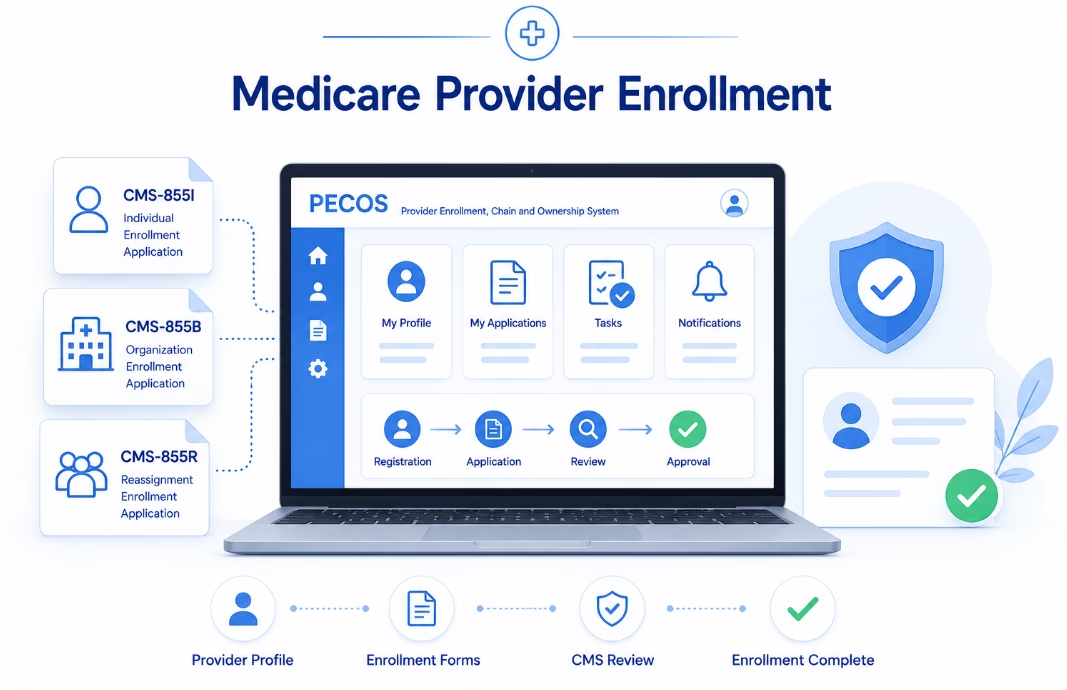
The Centers for Medicare & Medicaid Services (CMS) uses the Provider Enrollment, Chain, and Ownership System (PECOS) to support enrollment applications, changes of information, reassignments, and revalidation activities.
Healthcare organizations must keep their Medicare enrollment information accurate and complete.
Common administrative problems include:
- Incorrect legal business names or tax information.
- Outdated practice locations.
- Unreported ownership or control changes.
- Incorrect electronic funds transfer information.
- Incomplete Medicare enrollment applications.
- Missing supporting documents or signatures.
- Missed revalidation deadlines.
- Unresolved Medicare Administrative Contractor requests.
These issues do not automatically produce the same outcome. Depending on the circumstances, an application may require corrections, processing may be delayed, or CMS may take an applicable administrative action.
1. Incorrect Legal Business Names and Tax Information
Accurate legal business information is an important part of Medicare enrollment.
Providers and organizations must supply the appropriate legal names and identifying information required for their enrollment category.
Information to Verify
- Legal business name.
- Taxpayer Identification Number (TIN).
- Employer Identification Number (EIN), where applicable.
- Individual or organizational NPI.
- Legal business structure.
- Relevant authorized official information.
- Supporting IRS documentation when required.
Practices should review applicable IRS records, including documents such as a CP-575 notice or 147C letter when needed to verify tax information.
Not every minor difference in punctuation or abbreviation automatically results in enrollment rejection. However, incorrect identifying information may require clarification and supporting documentation.
Best practice: Use accurate legal entity information and resolve material inconsistencies before submitting applications.
2. Outdated PECOS and NPPES Information
Medicare enrollment records and NPI records serve different administrative purposes.
PECOS maintains Medicare provider enrollment information, while the National Plan and Provider Enumeration System (NPPES) maintains National Provider Identifier records.
Healthcare providers should verify that relevant information in each system is accurate.
Records to Review
- Provider legal name.
- Individual and organizational NPIs.
- Professional taxonomy information.
- Practice locations.
- Business mailing addresses.
- Contact information.
- Applicable organizational relationships.
These records do not necessarily require identical formatting because each system has different information fields and purposes.
However, information should accurately reflect the provider’s current circumstances.
Updating NPPES does not automatically update Medicare enrollment information maintained in PECOS.
For a detailed comparison, read our PECOS vs. CAQH vs. NPPES guide.
3. Missing Medicare Enrollment Change-Reporting Deadlines
Medicare providers and suppliers must report specified enrollment changes within applicable regulatory deadlines.
Under 42 CFR § 424.516, physicians, nonphysician practitioners, and their organizations generally must report certain changes within 30 days and other enrollment changes within 90 days.
Changes Generally Requiring Reporting Within 30 Days
- Changes in ownership or control.
- Changes involving practice locations.
- Final adverse legal actions.
- Other changes subject to shorter reporting deadlines under applicable provider or supplier regulations.
Changes Generally Requiring Reporting Within 90 Days
For many provider categories, other enrollment information changes are generally reportable within 90 days.
The exact requirements depend on the provider or supplier classification and the nature of the change.
For example, DMEPOS suppliers and certain institutional suppliers may have additional reporting obligations.
Healthcare organizations should determine the correct deadline for each change rather than applying one universal reporting period.
CMS explains these obligations in its Medicare Provider and Supplier Enrollment guidance.
4. Medicare EFT Errors and Banking Information Problems
Electronic funds transfer allows Medicare payments to be deposited directly into the provider’s or supplier’s designated financial institution.
Medicare enrollment regulations require applicable providers and suppliers to establish EFT arrangements when completing specified enrollment activities.
Form CMS-588 is the Electronic Funds Transfer Authorization Agreement used for this purpose.
Errors in EFT documentation can create enrollment processing complications or interfere with payment arrangements.
Common Medicare EFT Errors
- Incorrect bank routing number.
- Incorrect account number.
- Incomplete financial institution information.
- Inconsistent account holder information.
- Missing required supporting documentation.
- Missing authorized official signature.
- Outdated banking information after an account change.
- Submitting documentation that does not satisfy CMS instructions.
Practices should review all applicable instructions before submitting new or updated EFT information.
Medicare EFT Verification Checklist
- Confirm the correct provider or supplier legal business name.
- Verify the applicable TIN and NPI.
- Confirm the financial institution name.
- Verify the nine-digit routing transit number.
- Review the complete bank account number.
- Confirm whether the account is checking or savings.
- Provide supporting banking documentation when required.
- Confirm that the appropriate authorized or delegated official signs the form.
- Retain submission and processing confirmations.
- Update Medicare EFT records when banking arrangements change.
CMS-588 instructions specify that starter checks are not acceptable for EFT confirmation.
Security reminder: Banking documents and account information should be handled through authorized, secure processes. Avoid transmitting complete financial account details through unsecured email or messaging channels.
Review the official CMS-588 Electronic Funds Transfer Authorization Agreement.
5. What Is a Medicare Stay of Enrollment?
A stay of enrollment is a temporary Medicare administrative action that can apply when certain enrollment requirements are not satisfied.
CMS may apply a stay under applicable regulations, including certain situations involving enrollment reporting or revalidation issues.
A stay may result in Medicare payments being held while the relevant issue is addressed.
A stay of enrollment is not necessarily the same as deactivation or revocation of Medicare billing privileges.
Practices should review the specific CMS or Medicare Administrative Contractor notice to determine the reason for the stay, its effective date, and the corrective action required.
The consequences depend on the applicable regulatory provision and circumstances.
6. Medicare Deactivation vs. Revocation
Medicare deactivation and revocation are separate administrative actions with different consequences.
| Deactivation | Revocation |
|---|---|
| Stops billing privileges under an applicable deactivation basis. | Terminates enrollment and billing privileges under an applicable revocation basis. |
| May result from missed revalidation or certain other enrollment failures. | May result from regulatory violations or other specified grounds. |
| Requires satisfaction of applicable reactivation procedures. | May involve additional restrictions and administrative consequences. |
| Medicare generally does not reimburse services furnished during the deactivated period. | Payment and enrollment consequences depend on the applicable revocation authority and effective date. |
Neither action should be assumed solely because a provider receives an enrollment correction request.
For a deeper explanation, read our Medicare enrollment compliance and revocation prevention guide.
7. Medicare Revalidation Errors
Medicare revalidation requires enrolled providers and suppliers to periodically confirm the accuracy of their enrollment information.
CMS generally requires:
- Most Medicare providers and suppliers: Revalidation every five years.
- DMEPOS suppliers: Revalidation every three years.
- Off-cycle revalidation: CMS may request revalidation outside the normal cycle.
Failing to revalidate on time may result in Medicare payment holds or deactivation of billing privileges.
Common Revalidation Mistakes
- Failing to monitor the CMS revalidation due date.
- Relying entirely on mailed reminders.
- Maintaining an outdated correspondence address.
- Missing supporting documentation.
- Failing to respond to Medicare contractor requests.
- Submitting inaccurate ownership or location information.
- Assuming an incomplete application satisfies the revalidation requirement.
CMS maintains a public revalidation list that providers can use to review applicable due dates.
Visit the CMS Medicare Revalidation List.
8. How Revalidation Problems Can Affect Medicare Payments
If a provider does not complete required Medicare revalidation activities, CMS or the responsible contractor may hold Medicare payments or deactivate billing privileges, depending on the applicable circumstances.
When billing privileges are deactivated, the provider must follow the appropriate procedures to restore enrollment status.
Medicare generally does not reimburse services furnished during the deactivation period.
Practices should not assume that all services furnished during a period of deactivation can be billed retrospectively after reactivation.
For current instructions, consult the CMS Medicare Revalidation guidance.
9. Practical Medicare Enrollment Error Prevention Workflow
Healthcare practices can reduce avoidable enrollment errors through a structured administrative review process.
Step 1: Review Individual and Organizational Enrollment
Confirm that provider and practice enrollment records accurately describe the individuals and organizations involved in Medicare billing.
Step 2: Verify Legal and Tax Information
Review applicable IRS documentation, organizational information, NPIs, and TINs.
Step 3: Check Practice Locations and Ownership
Identify recent organizational or location changes that may require an enrollment update.
Step 4: Review EFT Information
Confirm that the current banking arrangement is accurately reflected in the applicable Medicare EFT records.
Step 5: Track Revalidation Due Dates
Review CMS revalidation information and prepare supporting documentation within the appropriate submission window.
Step 6: Monitor Outstanding Applications
Track PECOS submissions and respond to Medicare Administrative Contractor requests.
Step 7: Coordinate With Medical Billing
Communicate relevant enrollment changes, effective dates, and billing privilege issues to the revenue cycle team.
Step 8: Document Corrective Actions
Maintain a record of enrollment issues, assigned staff members, relevant deadlines, and final resolutions.
For a broader audit process, see our credentialing audit checklist for healthcare practices.
Medicare Enrollment Error Prevention Checklist
- Verify legal business names and tax information.
- Confirm individual and organizational NPIs.
- Review PECOS enrollment status.
- Check practice location information.
- Review ownership and management disclosures.
- Identify reportable organizational changes.
- Track applicable 30-day and 90-day deadlines.
- Verify EFT account and banking information.
- Confirm authorized signatures and required supporting records.
- Monitor revalidation deadlines.
- Review Medicare contractor correspondence.
- Track outstanding enrollment applications.
- Investigate Medicare payment holds or enrollment notices.
- Coordinate enrollment information with medical billing.
- Retain submission confirmations and corrective action records.
How eClinicAssist Helps With Medicare Enrollment Administration
Managing Medicare enrollment records, EFT documentation, and revalidation requirements can place additional responsibilities on healthcare practice administrators.
eClinicAssist supports healthcare organizations with administrative provider enrollment and credentialing activities, including:
- Medicare enrollment application preparation.
- PECOS changes of information.
- Provider documentation management.
- Medicare EFT enrollment coordination.
- Provider reassignment administration.
- Enrollment application follow-up.
- Revalidation deadline tracking.
- Coordination between credentialing and billing teams.
Our goal is to help practices maintain organized enrollment information, identify incomplete documentation, and manage administrative deadlines.
CMS and Medicare Administrative Contractors remain responsible for enrollment decisions, billing privilege determinations, payment processing, and regulatory actions.
Need help reviewing Medicare enrollment records, EFT documentation, or revalidation requirements?
Contact eClinicAssist to discuss your Medicare enrollment needs.
Frequently Asked Questions About Medicare Enrollment Errors
What are the most common Medicare enrollment errors?
Common errors include incorrect legal business information, outdated practice locations, missing ownership updates, incomplete EFT documentation, unresolved Medicare contractor requests, and missed revalidation deadlines.
Can incorrect EFT information delay Medicare payments?
Yes. Incorrect or incomplete EFT documentation can create enrollment processing complications or interfere with Medicare payment arrangements. Providers should correct the information through the applicable CMS or Medicare Administrative Contractor process.
What is CMS-588?
CMS-588 is the Electronic Funds Transfer Authorization Agreement used to establish or update applicable Medicare direct deposit arrangements.
How often must Medicare providers revalidate?
Most Medicare providers and suppliers generally revalidate every five years. DMEPOS suppliers generally revalidate every three years, and CMS may request off-cycle revalidation.
What happens if Medicare revalidation is missed?
Missing a required revalidation deadline may result in a Medicare payment hold or deactivation of billing privileges. Providers should follow the applicable CMS or Medicare contractor instructions promptly.
Does every enrollment mistake cause a Medicare payment suspension?
No. The consequences depend on the specific issue and applicable regulations. Some errors require administrative corrections, while certain enrollment failures may lead to more serious actions.
Is a Medicare stay of enrollment the same as deactivation?
No. A stay of enrollment and deactivation are distinct Medicare administrative actions with different requirements and payment consequences.
Does updating NPPES automatically update PECOS?
No. NPPES and PECOS maintain different records. Providers must review and update applicable enrollment information separately.
Disclaimer: This article provides general educational and administrative information about Medicare enrollment, EFT documentation, PECOS records, and revalidation. It does not constitute legal, regulatory, credentialing, or billing advice. Requirements vary by provider and supplier category and individual circumstances. Confirm current obligations with CMS, the appropriate Medicare Administrative Contractor, or qualified professional advisers. eClinicAssist does not guarantee Medicare enrollment approval, uninterrupted billing privileges, processing times, or reimbursement outcomes.